Mostrando las entradas con la etiqueta DB. Mostrar todas las entradas

2 de junio de 2022

Tips para disminuir el consumo de créditos en OCI

Buenas tardes, les voy a compartir algo muy interesante de como se puede ahorrar créditos dentro de OCI de una forma muy sensilla.

Antes de seguir, me ayudarian si siguen el blog:  SEGUIR !! Gracias

Como bien saben los costos de los recursos dentro de oci se cobran por uso. De esta forma nosotros podriamos configurar de forma automática apagar o bajar el uso de CPU según lo necesitemos.

Les voy a dar dos grandes ejemplos que usan la mayoria de las empresas para este caso.

1. Apagar instancias no productivas en horario nocturno y fin de semana

2. Bajar el uso de CPUs de Instancias (productivas o no) en horario y días que no tengan tanda demanda.


Estas configuraicones las podemos realizar gestionando nuestro tenant a travez de oci cli.

Para eso, primero debemos instalar OCICLI, dejo aca el link al post del paso a paso. Instalación

Una vez que tenemos una VM con OCI cli instalado y funcionando. Lo único que tenemos que hacer es crear los comandos para cada acción y dejarlos croneados en un crontab o en mi caso les voy a mostrar un menu muy sensillo en Linux.


1) Este es un comando muy facil para apagar o prender instancias:

oci compute instance action --action start --instance-id ocid1.instance.oc1.sa-saopaulo-1.antxeljrasdft4weycmftv6y6gqaiedqas2fxooiz6treewfasdcrur2d6onas4iq

or apagado:

oci compute instance action --action stop --instance-id ocid1.instance.oc1.sa-saopaulo-1.antxeljrasdft4weycmftv6y6gqaiedqas2fxooiz6treewfasdcrur2d6onas4iq

El detalle de eso lo podemos ver con el parametro --help:


Action Description: Performs one of the following power actions on the specified instance:

o START - Powers on the instance.
o STOP - Powers off the instance.
o RESET - Powers off the instance and then powers it back on.
o SOFTSTOP - Gracefully shuts down the instance by sending a shutdown

Con este comando, la idea es por ejemplo dejar un crontab que apague la instancia a las 18hs y la prenda a las 9am. Podemos armar un script .sh con el comando visto anteriormente.


2) En caso de contar con un EXACS que podemos bajar y subir los OCPU dinámicamente en forma online (esto quiere decir que no es necesario hacer un reinicio de las instancias=
Se puede programar que por ejemplo en horario nocturno o los fin de semana en lugar de ocupar 60OCpu ocupemos 10. y la reducción mensual de créditos en este caso es considerable.
Para eso el comando es el siguiente:

oci db cloud-vm-cluster update --cloud-vm-cluster-id ocid1.cloudvmcluster.oc1.sa-saopaulo-1.abtxel124ftjrs5qertujsrcyobl5pjuvne3asdprzxasdgfyzj11l2nzas4wca --cpu-core-count 28


Ahora que les mostré los dos comandos, vamos a ver como automatizarlos.

Ejemplo creamos un script para cada comando.
start_intance.sh
up_ocpu.sh
stop_instance.sh
down_ocpu_sh

Línea de crontab:
# Detención de Lunes a Viernes
00 18 * * 1-5 /scripts_oci/stop_instance.sh 
00 18 * * 1-5 /scripts_oci/down_ocpu.sh 

# Inicio de Lunes a Viernes a las 9am
00 9 * * 1-5 /scripts_oci/stop_instance.sh 
00 18 * * 1-5 /scripts_oci/up_ocpu.sh 

Otra opción es crear un menú interactivo en el cual podemos dar las opciones a un operador.:
Ejemplo scripts:

#!/bin/bash
#cpeque 23/05/2022
clear
while :
do
echo " Escoja una opcion para OCI "
echo "-----------------------------"
echo "1. Scale Down EXACS OCPU"
echo "2. Scale UP EXACS OCPU"
echo "3. Apagar instancias"
echo "4. Iniciar Instancias"
echo "5. Salir"
echo -n "Seleccione una opcion [1 - 5]: "

read opcion
case $opcion in

1) echo "Scale Down EXACS OCPU"
while true; do
echo
read -p "Confirmar Scale Down EXACS OCPU? " yn
case $yn in
y ) break;;
n ) exit;;
* ) echo "por favor responda Y o N ";;
esac
done
echo "Se procede con el Scale Down EXACS OCPU..."
/home/ocicliusr/scripts/down_ocpu.sh;;

2) echo "Scale UP EXACS OCPU"
while true; do
echo
read -p "Confirmar Scale UP EXACS OCPU? " yn
case $yn in
y ) break;;
n ) exit;;
* ) echo "por favor responda Y o N ";;
esac
done
echo "Se procede con el Scale UP EXACS OCPU..."
/home/ocicliusr/scripts/up_ocpu.sh;;

3) echo "Apagar instancias"
while true; do
echo
read -p "Confirmar Apagar instancias? " yn
case $yn in
y ) break;;
n ) exit;;
* ) echo "por favor responda Y o N ";;
esac
done
echo "Se procede con el apagado de las instancias...."
/home/ocicliusr/scripts/stop_instance.sh;;

4) echo "Iniciar Instancias"
while true; do
echo
read -p "Confirmar Iniciar Instancias? " yn
case $yn in
y ) break;;
n ) exit;;
* ) echo "por favor responda Y o N ";;
esac
done
echo "Se procede a Iniciar Instancias.."
/home/ocicliusr/scripts/start_intance.sh;;

5) echo "Exit";
exit 1;;
*) echo "$opc es una opcion invalida. ";

echo "Presiona ENTER para continuar...";
read foo;;
esac
done

Output Script: 


Espero que les sea útil y puedan ahorrar créditos universales para usarlos en más instancias de OCI ;-)

Los invito a seguir mi blog: SEGUIR

16 de mayo de 2022

Como realizar un Backup con RMAN usando Objects Storage en OCI


Buenas!!, hace rato que no escrito nada en el post pero hace poco realice una configuración muy interesante en un equipo en Oracle OCI y se me dificulto buscar información concreta.

Como todos saben hoy Oracle, ofrece servicios de DB en la nube que tienen muchísimas ventajas y automatizaciones. Servicios como DBCS, ADB, EXACS… pero también podríamos tener una Instancia Linux con un motor de Oracle Database administrado por nosotros en la nube.  Y para este último caso, les cuento que es posible hacer uso de algunas de las ventajas que tenemos en la nube, como por ejemplo realizar los backups de archive y de la db con rman directamente en objects storage utilizando la tool de Cloud Backup de Oracle. Esta configuración nos va a permitir bajar los costos de storage para el almacenamiento de los mismos y no preocuparnos por el espacio que estemos utilizando ya que lo resolveríamos directamente en OCI.

Para realizar esta tarea vamos a ver los siguientes pasos:

  1. Descarga e instalación de Oracle Database Cloud Backups Module.
  2. Instalación de JAVA
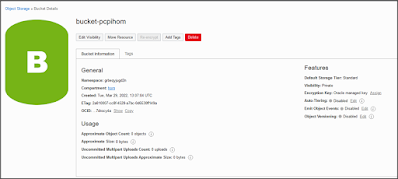
  3. Creación del Objects-Storage
  4. Recompilación de información en OCI para la configuración
  5. Creación de PareKey en Oracle Home.
  6. Ejecución
  7. Configuraciones Particulares de RMAN

La actividad se realizo sobre un Oracle Linux 7.9 y un Oracle Database 19c.

Tips:

  • No me funciono con jdk 18, se instalo una versión particular que vemos más adelante.
  • Si no encuentran los objetos desde la consola de oci pero en RMAN funciona todo bien, seguramente falto el parámetro que indica el nombre del Objects-Storage
  • En la documentación van a ver que se hace referencia a distintos valores como UOCID, TOCID, etc.. En oci siempre es el valor OCID (Id del recurso), pero se hace referencia como por ejemplo el User OCID -> UOCID. En conclusión cuando buscan la información en OCI todos tienen el mismo nombre: OCID.
  • El Bucket hay que crearlo tipo Standard, sino da error: ORA-27192: skgfcls: sbtclose2 KBHS-00719: Error 'NotRestored'; The object is in Archive tier and needs to be restored.
  • Es obligatorio activar la encriptación.

1. Software

Bajar de OTN Oracle Cloud Backup Module

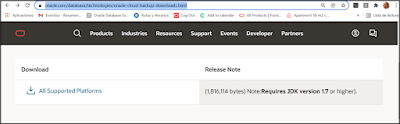
https://www.oracle.com/database/technologies/oracle-cloud-backup-downloads.html


Hacemos click en “All Supported Platforms” y descargamos el file “opc_installer.zip”

Dejamos el .zip en /home/oracle por ejemplo y lo descomprimimos.


2. Instalación JAVA

La versión de java con la que me funciono es la siguiente:

https://www.oracle.com/java/technologies/javase/javase8u211-later-archive-downloads.html


cd /u01/java

tar zxvf jre-8u331-linux-x64.tar.gz

Agregar las variables al .bashrc file y volver a loguearnos

vi .bashrc

# User specific aliases and functions

export JAVA_HOME=/u01/java/jre1.8.0_331

export PATH=$JAVA_HOME/bin:$PATH

- Volver a loguearnos para que tome las variables

$ java -version

java version "1.8.0_331"

Java(TM) SE Runtime Environment (build 1.8.0_331-b09)

Java HotSpot(TM) 64-Bit Server VM (build 25.331-b09, mixed mode)


3. Creación de Buckets

Es necesario loguearnos en OCI dentro del compartment que seleccionemos en base al entorno o ubicación de la db que vayamos a backupear.

Para crearlo vamos a Storage y luego en Buckets


Click en "Create Bucket"

Dejar el tipo "Standard".


4. Obtener la información necesario de OCI


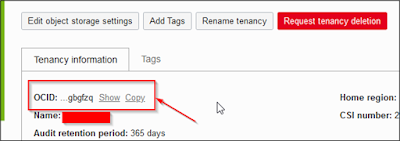
TOCID:  

Es el Tenancy ID y lo obtenemos visualizando el detalle del mismo, dentro de Governance & Administration -> Tenancy Details


COCID:

El compartment ID donde creamos nuestro Buckets.

Para obtenerlo vamos al menú identity y luego al sub menú compartment:


Luego seleccionamos el compartment donde creamos nuestro bucket y copiamos el OCID:


UOCID:

El user ID, este usuario tiene que tener acceso al Bucket que creamos, también pude ser un usuario de servicio creado en OCI. En otro post voy a explicar como crear un usuario y darle los permisos mínimos. Por el momento lo voy a mostrar con mi usuario:

Logueados en OCI vamos a nuestro profile:


Objects-Storage URL

El Listado de url para el objects-storage lo podemos obtener del siguiente links:

https://docs.oracle.com/en-us/iaas/api/#/en/objectstorage/20160918/

En particular en mi caso voy a utilizar el de la región de SapPAulo.

-host https://objectstorage.sa-saopaulo-1.oraclecloud.com

5. Creación de Keys al usuario

Es necesario crear un par de keys para la segura conexión al Buckets, para esto lo podemos hacer en forma automática desde la misma tools de Oracle.

Validar Variable ORACLE_HOME:


$ echo $ORACLE_HOME
/u01/app/oracle/product/19.0.0/dbhome_1
$ cd /home/oracle/opc_installer/oci_installer
$ java -jar oci_install.jar -newrsakeypair -walletDir $ORACLE_HOME/dbs/opc_wallet

Oracle Database Cloud Backup Module Install Tool, build 19.3.0.0.0DBBKPCSBP_2019-10-16

OCI API signing keys are created:
PRIVATE KEY --> /u01/app/oracle/product/19.0.0/dbhome_1/dbs/opc_wallet/oci_pvt
PUBLIC KEY --> /u01/app/oracle/product/19.0.0/dbhome_1/dbs/opc_wallet/oci_pub

Please upload the public key in the OCI console.


Dentro de la consola de OCI, en el profile del usuario que se va a conectar con el Bucket, es necesario pegar la key que generamos en el paso anterior.

Vamos a profile y abajo a la izquierda en la lista de recursos seleccionamos API Keys y click en ADD.


Dentro pegamos la public key que creamos en el paso anterior:


Luego hacer click en ADD y nos va a mostrar la información para el /oci/config file


En este paso obtenemos el fingerprint para la linea de ejecución.

cd (vamos al home)

mkdir ~/.oci    

cd .oci

vi config


[DEFAULT]

user=ocid1.user.oc1..aaaaaaaa47izg2ornzi56cu6bl6stmtyqcuwfkllaoq7nyi4f2k7du7z3kkq

fingerprint=ec:6d:5b:51:18:ee:ff:26:91:df:ad:fc:94:22:6b:6d

tenancy=ocid1.tenancy.oc1..aaaaaaaayu7yg6vebcjpmx7xjkfp34osppv4oewvayazvze5eix3sygbgfzq

region=sa-saopaulo-1

key_file=/u01/app/oracle/product/19.0.0/dbhome_1/dbs/opc_wallet/oci_pvt


6. Ejecución

Ya estamos en condiciones de ejecutar el comando de instalación de las librerías de backup


Revisión de Parámetros:

java -jar oci_install.jar -host https://objectstorage.sa-saopaulo-1.oraclecloud.com

-pvtKeyFile $ORACLE_HOME/dbs/opc_wallet/oci_pvt

-pubFingerPrint ec:7d:3h:51:18:ee:ff:11:91:df:ad:fc:94:13:6b:8d

-tOCID ocid1.tenancy.oc1..aaaaaaaayu7y************************************ygbgfzq

-uOCID ocid1.user.oc1..aaaaaaa****************************************k7du7z3kkq

-libDir $ORACLE_HOME/lib

-walletDir $ORACLE_HOME/dbs/opc_wallet

-bucket bucket-name


Ejecución

java -jar oci_install.jar -host https://objectstorage.sa-saopaulo-1.oraclecloud.com -pvtKeyFile $ORACLE_HOME/dbs/opc_wallet/oci_pvt -pubFingerPrint ec:6d:5b:51:18:ee:ff:26:91:df:ad:fc:94:22:6b:6d -tOCID ocid1.tenancy.oc1..aaaaaaaay**************************************gfzq -uOCID ocid1.user.oc1..a********************************u7z3kkq -libDir $ORACLE_HOME/lib -walletDir $ORACLE_HOME/dbs/opc_wallet -bucket bucket-name

Oracle Database Cloud Backup Module Install Tool, build 19.3.0.0.0DBBKPCSBP_2019-10-16

Oracle Database Cloud Backup Module credentials are valid.

Backups would be sent to bucket bucket-name.

Oracle Database Cloud Backup Module wallet created in directory /u01/app/oracle/product/19.0.0/dbhome_1/dbs/opc_wallet.

Oracle Database Cloud Backup Module initialization file /u01/app/oracle/product/19.0.0/dbhome_1/dbs/opccdbdb.ora created.

Downloading Oracle Database Cloud Backup Module Software Library from Oracle Cloud Infrastructure.

Download complete.


 7.      Configure RMAN 

$ rman target /
Recovery Manager: Release 19.0.0.0.0 - Production on Tue Apr 12 22:11:10 2022
Version 19.13.0.0.0
Copyright (c) 1982, 2019, Oracle and/or its affiliates.  All rights reserved.
connected to target database: DBNAME (DBID=2396711937)
 
RMAN> CONFIGURE CHANNEL DEVICE TYPE 'SBT_TAPE' PARMS
 'SBT_LIBRARY=/u01/app/oracle/product/19.0.0/dbhome_1/lib/libopc.so,
 SBT_PARMS=(OPC_PFILE=/u01/app/oracle/product/19.0.0/dbhome_1/dbs/opccdbdb.ora)';
using target database control file instead of recovery catalog
new RMAN configuration parameters:
CONFIGURE CHANNEL DEVICE TYPE 'SBT_TAPE' PARMS  
'SBT_LIBRARY=/u01/app/oracle/product/19.0.0/dbhome_1 /lib/libopc.so, 
SBT_PARMS=(OPC_PFILE=/u01/app/oracle/product/19.0.0/dbhome_1/dbs/opccdbdb.ora)';
new RMAN configuration parameters are successfully stored


RMAN> CONFIGURE DEFAULT DEVICE TYPE TO SBT_TAPE;
new RMAN configuration parameters:
CONFIGURE DEFAULT DEVICE TYPE TO 'SBT_TAPE';
new RMAN configuration parameters are successfully stored
released channel: ORA_DISK_1
 
RMAN> CONFIGURE BACKUP OPTIMIZATION ON;
new RMAN configuration parameters:
CONFIGURE BACKUP OPTIMIZATION ON;
new RMAN configuration parameters are successfully stored
 
RMAN> CONFIGURE ENCRYPTION FOR DATABASE ON;
using target database control file instead of recovery catalog
new RMAN configuration parameters:
CONFIGURE ENCRYPTION FOR DATABASE ON;
new RMAN configuration parameters are successfully stored
 
RMAN> SET ENCRYPTION ON IDENTIFIED BY 'clave encriptación' ONLY; 
executing command: SET encryption


Prueba


RMAN> backup current controlfile;

Starting backup at 12-APR-22
using channel ORA_SBT_TAPE_1
channel ORA_SBT_TAPE_1: starting full datafile backup set
channel ORA_SBT_TAPE_1: specifying datafile(s) in backup set
including current control file in backup set
channel ORA_SBT_TAPE_1: starting piece 1 at 12-APR-22
channel ORA_SBT_TAPE_1: finished piece 1 at 12-APR-22
piece handle=040qpsal_4_1_1 tag=TAG20220412T221653 comment=API Version 2.0,MMS Version 21.0.0.1
channel ORA_SBT_TAPE_1: backup set complete, elapsed time: 00:00:03
Finished backup at 12-APR-22

Starting Control File and SPFILE Autobackup at 12-APR-22
piece handle=c-2396793937-20220412-01 comment=API Version 2.0,MMS Version 21.0.0.1
Finished Control File and SPFILE Autobackup at 12-APR-22


si te gusto te invito a seguirme: SEGUIR

2 de septiembre de 2021

Ejecutar RDA (Remote Diagnostic Agent) para validar un ORACLE RAC


Buenas!!, hace rato no escribo. En esta oportunidad les quiero mostrar como utilizar RDA, si bien es una herramienta que existe hace tiempo, no todos la conocen ni saben para que la podrían utilizar.

RDA es “Remote Diagnostic Agent”, es una tool de Oracle gratuita (Cuando nos referimos a gratuita que se necesita una cuenta de support con cualquier licencia, no se abona nada extra).

Nota de referencia de RDA: Oracle Support Document 314422.1 (Remote Diagnostic Agent (RDA) - Getting Started) can be found at: https://support.oracle.com/epmos/faces/DocumentDisplay?id=314422.1

Poque usar RDA?

Por lo gral el RDA lo pide support para tener un panorama general del ambiente frente un issue en algún ticket de support, pero también lo podemos usar nosotros para validar nuesto ambiente ya que recompila info de todos los servicios y productos de la instalación.  

Productos Soportados

Esta es la lista de productos soportados en la última versión de RDA que existe a la fecha:

  • OLAP Products (Express Server, Financial Analyzer, and Demand Planning Server)
  • Oracle Application Server (iAS 1.0.2.x/9.0.x/10.1.2.x/10.1.3.x,10.1.4.x,WebLogic Server (WLS) Release 9.x, 10.x, 11g and 12c (WLS), HTTP Server,WebCache,J2EE/OC4J)
  • Oracle Billing and Revenue Management products
  • Oracle BPEL Process Manager
  • Oracle Collaboration Suite (Email Server,Calendar,Discussions,Content Services,Workspaces,WebClient,and Wireless)
  • Oracle Data Integrator
  • Oracle Developer (Forms and Reports)
  • Oracle Ebusiness Suite 11i and 12
  • Oracle Enterprise Content
  • Oracle Enterprise Single Sign-on
  • Oracle Enterprise performance management (Hyperion) products
  • Oracle Guardian
  • Oracle Identity Management products
  • Oracle JDBC/PRO *C/ODBC and other development client related information
  • Oracle Management Server and Intelligent Agent (Grid Server, Agent Server, DB Control)
  • Oracle Networking products
  • Oracle RAC Cluster (Single/Multiple Nodes, Automatic Storage Management, Oracle Cluster File System, Data Guard)
  • Oracle RDBMS Server (Standard and Enterprise Editions)
  • Oracle Retail (Retek)
  • Oracle SQL*Plus/iSQL*Plus
  • Oracle TimesTen In-Memory Database
  • Oracle Universal Archive (11g)
  • PeopleSoft
  • Siebel

 En este caso voy a mostrarles como utilizarla para validar una Instalación de RAC que acabo de realizar hace poco, si bien funciona todo, no viene de más ejecutar el RDA para que valide todos los parámetros, variables y best practice para una instalación Estándar de Oracle RAC.

Y para este caso en particular tenemos justo una nota:

Oracle Support Document 359395.1 (Remote Diagnostic Agent (RDA) - RAC Cluster Guide) can be found at: https://support.oracle.com/epmos/faces/DocumentDisplay?id=359395.1

1.       Descargar RDA según plataforma: (en mi caso Oracle Linux 7)


Verán que es compatible con muchas plataformas!

Cuando lo descarguen, presten atención a la versión y año, ya que no lo muestra ordenado.


2.       Próximo paso lo descargo y lo pego por lo gral en el home del usuario grid.


sftp> put p21769913_204201020_LINUX.zip

     Uploading p21769913_204201020_LINUX.zip to       

     /home/oracle/p21769913_204201020_LINUX.zip

  100% 20637KB    322KB/s 00:01:04 

 [grid@]$ unzip p21769913_204201020_LINUX.zip


  Validación de RDA.

Hay que tomar en cuenta que como vamos a validar un RAC, el script lo debemos ejecutar como grid. No viene de más validar que el .zip que descargamos no tenga ningún problema, para eso se realiza una rápida validación:

[grid@]$ ./rda.sh -cv

Loading the file list ...


Checking the directory [D_RDA] . ...
Checking the directory [D_RDA] engine ...
Checking the directory [D_RDA_ADM] model ...
Checking the directory [D_RDA_CHK] APPS ...
Checking the directory [D_RDA_CHK] BI ...
Checking the directory [D_RDA_CHK] CGBU ...
Checking the directory [D_RDA_CHK] DB ...
Checking the directory [D_RDA_CHK] EM ...
Checking the directory [D_RDA_CHK] OFM ...
Checking the directory [D_RDA_CHK] TEST ...
Checking the directory [D_RDA_COL] APPS ...
Checking the directory [D_RDA_COL] BI ...
Checking the directory [D_RDA_COL] CGBU ...
Checking the directory [D_RDA_COL] CLOUD ...
Checking the directory [D_RDA_COL] DA ...
Checking the directory [D_RDA_COL] DB ...
Checking the directory [D_RDA_COL] EM ...
Checking the directory [D_RDA_COL] EXPLORER ...
Checking the directory [D_RDA_COL] OFM ...
Checking the directory [D_RDA_COL] OS ...
Checking the directory [D_RDA_COL] PGBU ...
Checking the directory [D_RDA_COL] RDA ...
Checking the directory [D_RDA_COL] SAMPLE ...
Checking the directory [D_RDA_COL] TOOL ...
Checking the directory [D_RDA_CSS] . ...
Checking the directory [D_RDA_DAT] . ...
Checking the directory [D_RDA_DFW] cv0200 ...
Checking the directory [D_RDA_INC] Convert/Common ...
Checking the directory [D_RDA_INC] Convert/DB/LOG ...
Checking the directory [D_RDA_INC] Convert/OFM/OIM ...
Checking the directory [D_RDA_INC] Convert/OS/INST ...
Checking the directory [D_RDA_INC] Convert/OS/OS ...
Checking the directory [D_RDA_INC] Convert/RDA/CONFIG ...
Checking the directory [D_RDA_INC] Convert/TOOL/ALERT ...
Checking the directory [D_RDA_INC] Convert/TOOL/COMPLY ...
Checking the directory [D_RDA_INC] IRDA ...
Checking the directory [D_RDA_INC] IRDA/CV0200 ...
Checking the directory [D_RDA_INC] RDA ...
Checking the directory [D_RDA_INC] RDA/Agent ...
Checking the directory [D_RDA_INC] RDA/Driver ...
Checking the directory [D_RDA_INC] RDA/Handle ...
Checking the directory [D_RDA_INC] RDA/Library ...
Checking the directory [D_RDA_INC] RDA/Limit ...
Checking the directory [D_RDA_INC] RDA/Local ...
Checking the directory [D_RDA_INC] RDA/Object ...
Checking the directory [D_RDA_INC] RDA/Operator ...
Checking the directory [D_RDA_INC] RDA/Request ...
Checking the directory [D_RDA_INC] RDA/SDCL ...
Checking the directory [D_RDA_INC] RDA/SDSL ...
Checking the directory [D_RDA_INC] RDA/Target ...
Checking the directory [D_RDA_INC] RDA/Token ...
Checking the directory [D_RDA_INC] RDA/UI ...
Checking the directory [D_RDA_INC] RDA/Value ...
Checking the directory [D_RDA_INC] RDA/Web ...
Checking the directory [D_RDA_MSG] charset ...
Checking the directory [D_RDA_MSG] desc ...
Checking the directory [D_RDA_MSG] en ...
Checking the directory [D_RDA_MSG] fr ...
Checking the directory [D_RDA_POD] en ...

No issues found


4.       Chequear Nodos y conectividad:

[grid@nodo01 rda]$ olsnodes

nodo01

nodo01

[grid@nodo01 rda]$ ssh nodo01

Last login: Sat Aug 21 16:08:38 2021

[grid@nodo02 ~]$ exit


5.       Para poder iniciar una recolección de información sobre el RAC, RDA necesita realizar una configuración inicial. Voy a mostrar el comando para la última versión RDA 8.X.

Recomiendo tener las variables de ambiente seteadas previamente, para que el RDA las reconozca automáticamente.

[grid@nodo1rda]$ ./rda.sh -vXRda start CLOUD -p Rac_Assessment

Creating collection "output" ...

        - Trying to identify the domain ... (can take time)

 Inside DFT scenario, define the input and profile targets

 Inside DFT scenario, check Oracle home or Middleware presence

        - RDA:DCbegin ...

------------------------------------------------------------------------------

RDA.BEGIN: Initializes the Data Collection

------------------------------------------------------------------------------

Enter the Oracle home to be used for data analysis

Press Return to accept the default (/u01/app/grid/18c)

> [ENTER]


        - RDA:DCconfig ...

------------------------------------------------------------------------------

RDA.CONFIG: Collects Key Configuration Information

------------------------------------------------------------------------------

        - RDA:DCocm ...

------------------------------------------------------------------------------

RDA.OCM: Set up the Configuration Manager Interface

------------------------------------------------------------------------------

        - RDA:DCstatus ...

------------------------------------------------------------------------------

RDA.STATUS: Produces the Remote Data Collection Reports

------------------------------------------------------------------------------

        - RDA:DCload ...

------------------------------------------------------------------------------

RDA.LOAD: Produces the External Collection Reports

------------------------------------------------------------------------------

        - RDA:DCfilter ...

------------------------------------------------------------------------------

RDA.FILTER: Controls Report Content Filtering

------------------------------------------------------------------------------

        - RDA:DCend ...

------------------------------------------------------------------------------

RDA.END: Finalizes the Data Collection

------------------------------------------------------------------------------

In CRS start scenario, getting nodes using /u01/app/grid/18c/bin/olsnodes

2>/dev/null

------------------------------------------------------------------------------

Requesting common cluster information

------------------------------------------------------------------------------

Enter the absolute path of the directory where RDA will be installed on the

remote nodes.

Press Return to accept the default (/home/grid/rda)

>[ENTER]

Do you want RDA to use an alternative login to execute remote requests (Y/N)?

Press Return to accept the default (N)

> [ENTER]


In CRS start scenario, getting local node information

In CRS start scenario, pinging node prorasf02

------------------------------------------------------------------------------

Requesting information for node prorasf01

------------------------------------------------------------------------------

Enter the Oracle home to be analyzed on the node prorasf01

Press Return to accept the default (/u01/app/grid/18c)

> [ENTER]


Enter the Oracle SID to be analyzed on the node prorasf01

> +ASM1


------------------------------------------------------------------------------

Requesting information for node prorasf02

------------------------------------------------------------------------------

Enter the Oracle home to be analyzed on the node prorasf02

Press Return to accept the default (/u01/app/grid/18c)

> [ENTER]


Enter the Oracle SID to be analyzed on the node prorasf02

> +ASM2 


        - RDA:DCremote ...

------------------------------------------------------------------------------

RAC Setup Summary

------------------------------------------------------------------------------

Nodes:

. NOD001  host01/+ASM1

. NOD002  host02/+ASM2

2 nodes found

[grid@ rda]$


6.       Ejecución Validar conectividad de los nodos configurados en el RDA (este comando también recolecta información) (Este paso demora según los recursos del servidor unos 20 a 30m)

[grid@host1]$ ./rda.sh -vC RDA.REMOTE list

Collecting diagnostic data ...

------------------------------------------------------------------------------

RDA Data Collection Started 21-Aug-2021 16:47:32

------------------------------------------------------------------------------

Processing RDA.BEGIN module ...

 Inside BEGIN module, testing the RDA engine code build

 Inside BEGIN module, testing the report directory

 Inside BEGIN module, testing the module targets

 Inside BEGIN module, launching parallel executions

Processing RDA.CONFIG module ...

 Inside CONFIG module, listing Oracle homes

 Inside CONFIG module, getting Oracle home inventory (can take time)

Processing RDA.REMOTE module ...

NOD001: Detecting storage type

NOD001: Running RDA command

NOD002: Detecting storage type

NOD002: Installing RDA software

NOD002: Running RDA command


NOD001: Transfering report package

NOD002: Transfering report package

Processing RDA.END module ...

 Inside END module, gathering system information

 Inside END module, getting CPU information (linux)

 Inside END module, getting memory information (linux)

 Inside END module, producing the file catalog

 Inside END module, producing target overview

 Inside END module, waiting for parallel execution completion

 Inside END module, producing setting overview

------------------------------------------------------------------------------

RDA Data Collection Ended 21-Aug-2021 16:57:05

------------------------------------------------------------------------------


7.       Ver Reporte

El RDa, genera 2 .zip con la información de cada nodo que nos deberíamos descargar y visualidar en un explorador.

Tomar en cuenta el espacio al descomprimirlos que pueden ser pesados. (1G por nodo)              

[grid@host1rda]$ ll output/remote/*

-rw-r-----. 1 grid oinstall 135000000 ago 21 16:55 output/remote/RDA_nod001_output.zip

-rw-r--r--. 1 grid oinstall 141063911 ago 21 16:56 output/remote/RDA_nod002_output.zip


Una vez que lo descomprimimos para visualizar el reporte abrimos el htm RDA_start.htm


Opción B.

También es posible ejecutar los paquetes disponibles aunque no del todo actualizados en el mismo RDA

[grid@host1  rda]$ ./rda.sh -T hcve

Processing HCVE tests ...

Available Pre-Installation Rule Sets:

1.Oracle Database 10g R1 (10.1.0) Preinstall (Linux)
2. Oracle Database 10g R2 (10.2.0) Preinstall (Linux)
3. Oracle Database 11g R1 (11.1) Preinstall (Linux)
4. Oracle Database 11g R2 (11.2.0) Preinstall (Linux)
5. Oracle Database 12c R1 (12.1.0) Preinstallation (Linux)
6. Oracle Database 12c R2 (12.2.0) Preinstallation (Linux)
7. Oracle Database 18c Preinstallation (Linux)
8. Oracle Database 19c Preinstallation (Linux)
9. Oracle Identity and Access Management PreInstall Check: Oracle Identity
and Access Management 11g Release 2 (11.1.2) Linux
10. Oracle JDeveloper PreInstall Check: Oracle JDeveloper 11g Release 2 (11.1.2.4) Linux
11. Oracle JDeveloper PreInstall Check: Oracle JDeveloper 12c (12.1.3)Linux
12. OAS PreInstall Check: Application Server 10g R2 (10.1.2) Linux
13. OAS PreInstall Check: Application Server 10g R3 (10.1.3) Linux
14. OFM PreInstall Check: Oracle Fusion Middleware 11g R1 (11.1.1) Linux
15. OFM PreInstall Check: Oracle Fusion Middleware 12c (12.1.3) Linux
16. OFM PreInstall Check: Oracle Fusion Middleware 12c (12.2.1.3.0) Linux
17. Oracle Forms and Reports PreInstall Check: Oracle Forms and Reports 11g Release 2 (11.1.2) Linux
18. Portal PreInstall Check: Oracle Portal Generic
19. IDM PreInstall Check: Identity Management 10g (10.1.4) Linux
20. BIEE PreInstall Check: Business Intelligence Enterprise Edition 11g (11.1.1) Linux
21. EPM PreInstall Check: Enterprise Performance Management Server (11.1.2) Generic
22. Oracle Enterprise Manager Cloud Control PreInstall Check: Oracle
Enterprise Manager Cloud Control 12c Release 4 (12.1.0.4) Linux
23. Oracle E-Business Suite Release 11i (11.5.10) Preinstall (Linux x86 and x86_64)
24. Oracle E-Business Suite Release 12 (12.1.1) Preinstall (Linux x86 and x86_64)
25. Oracle E-Business Suite Release 12 (12.2.0) Preinstall (Linux x86_64)

Available Post-Installation Rule Sets:
26. RAC 10G DB and OS Best Practices (Linux)
27. Data Guard Postinstall (Generic)
28. WLS PostInstall Check: WebLogic Server 11g (10.3.x) Generic
29. WLS PostInstall Check: WebLogic Server 12c (12.x) Generic
30. Portal PostInstall Check: Oracle Portal Generic
31. OC4J PostInstall Check: Oracle Containers for J2EE 10g (10.1.x) Generic
32. SOA PostInstall Check: Service-Oriented Architecture 11g and Later Generic
33. OSB PostInstall Check: Service Bus 11g and Later Generic
34. Oracle Forms 11g Post Installation (Generic)
35. Oracle Enterprise Manager Agent 12c Post Installation (Generic)
36. Oracle Management Server 12c Post Installation (Generic)
37. Network Charging and Control Database Post Installation (Generic)

Enter the HCVE rule set number or 0 to cancel the test

Press Return to accept the default (0)

> 26


Performing HCVE checks ...


Test "RAC 10G DB and OS Best Practices (Linux)" executed at 21-Aug-2021 17:36:22


Test Results

~~~~~~~~~~~~


ID     NAME                 RESULT  VALUE

====== ==================== ======= ==========================================

P00010 ORA_CRS_HOME         RECORD 

P00100 Database Name        RECORD 

P00102 Database Version     RECORD 

P00104 Interconnect Network RECORD 

P00106 DB Block Size        RECORD 

P00108 DB File Multiblock R RECORD 

P00120 Max Commit Propagati FAILED 

P00130 SYS.AUDSES$ Cache Si FAILED 

P00132 SYS.IDGEN1$ Cache Si FAILED 

P00140 Parallel Execution M FAILED 

P00150 Min Parallel Servers RECORD  0

P00152 parallel_min_servers FAILED 

P00200 $ORA_CRS_HOME Define FAILED  Missing

P00210 RemoteNodeInfo       PASSED  All loaded

P00220 _USR_ORA_DEBUG / CRS FAILED  host01:Unknown host01:Unknown

P00230 _USR_ORA_DEBUG / ORA FAILED  hosts02:? hosts02:?

P00240 rmem_max             PASSED  OK

P00250 UDP Buffer Size      PASSED  OK

P00260 wmem_max             PASSED  OK

P00270 rmem_default         PASSED  OK

P00280 wmem_default         PASSED  OK

P00290 SysRq Magic Keys     FAILED  host01:16 host02:16

P00300 Oracle Executable Li PASSED  linked

P00310 hangcheck-timer      FAILED  host01:Unknown host02:Unknown

P00320 aio-max-size Setting FAILED  hosts01:Unknown host02:Unknown

P00330 Memory (32-bit)      PASSED  OK

P00340 Swap (32-bit)        PASSED  OK

P00350 Swap (64-bit)        PASSED  OK

P00360 Patch List           PASSED  Complete

Result file: output/collect/DB_HCVE_P_RAC_lin_res.htm


 Espero que les sriva!!